
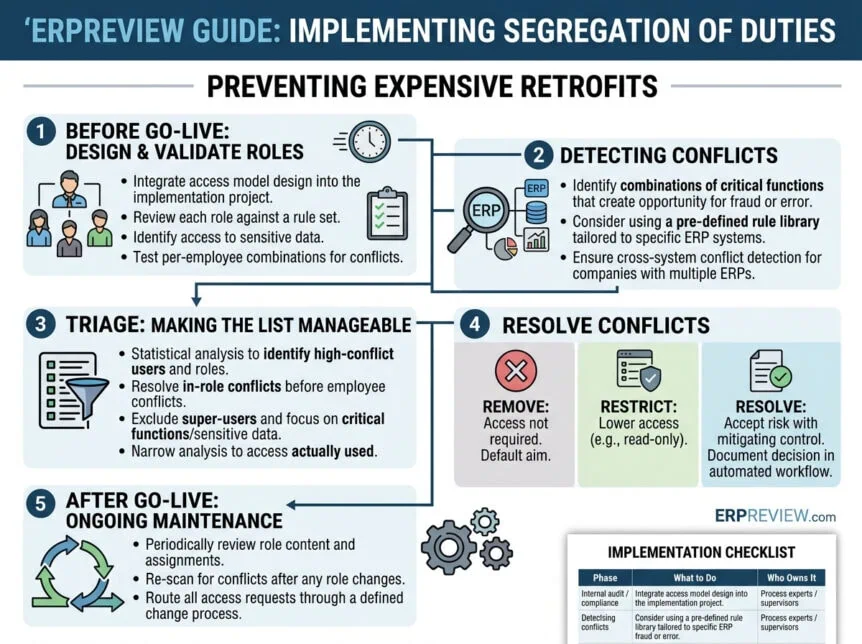
Compliance is the first thing sacrificed to a go-live date and the most expensive thing to retrofit afterwards. This guide sets out how to implement segregation of duties in an ERP system properly: what to do during the implementation project, how to find conflicts without building a rule set from scratch, how to make an unmanageable conflict list manageable, how to resolve what you find, and how to stop the model degrading once it is live.
What segregation of duties is
Segregation of duties (SoD), also called separation of duties, is the practice of dividing tasks and responsibilities among multiple people so that no single individual controls every aspect of a critical business process. The purpose is to make fraud and undetected error structurally difficult rather than merely discouraged. It matters most in financial processes, but applies equally in IT, HR and operations.
The four components
A complete transaction cycle breaks into four activities. Distributing them among different people creates the checks and balances that make the control work.
- Authorisation — the initial approval of a transaction or activity.
- Execution — actually carrying out the transaction.
- Record keeping — documenting what happened.
- Reconciliation — verifying the accuracy and completeness of the result.
What it looks like in practice
- Financial transactions. One person authorises payments, a second executes them, a third reconciles the bank statements. No individual can both authorise and execute a payment without it being visible.
- IT security. One person creates user accounts, another grants access permissions, a third monitors system logs. This is the control that stops an administrator quietly granting themselves access.
- Procurement. One employee raises purchase orders, another receives the goods, a third processes payment. Without this split, a single person can order, receive and pay for goods that never existed.
The benefits, and the honest difficulties
Done properly, SoD reduces fraud and error, makes accountability explicit, satisfies regulatory requirements, and — counter-intuitively — often improves operational efficiency, because tasks end up performed by the people actually equipped to do them.
It is not free of difficulty. Smaller organisations frequently do not have enough people to separate every duty cleanly, and segregating duties in an established business can require real changes to workflows and systems. Neither problem removes the obligation; both are reasons to design mitigating controls deliberately rather than pretend the conflict is not there.
Why regulators require it
SoD is not only good practice. Several regulatory frameworks mandate it, and your auditor will ask for evidence that it is in place and maintained.
| Framework | What it requires | Relevance to SoD |
| Sarbanes-Oxley (SOX) | Management and external auditors must report on the adequacy of internal control over financial reporting, under Section 404. | SoD is a core component of that internal control. Access conflicts are a standard audit finding. |
| GDPR | Robust internal controls to protect personal data. | Controls over who can access and change personal data depend on duties being separated. |
| HIPAA | Administrative, physical and technical safeguards for electronic protected health information. | SoD is one of the administrative safeguards expected. |
| PCI DSS | Strong access control measures for organisations handling cardholder data. | Access control requirements are unachievable without segregation of duties. |
Why segregation of duties gets postponed — and what it costs
Deploying an ERP system, whether SAP, Oracle, Infor, Microsoft or any other, is a demanding project. Implementation teams work hard to reach the go-live date, and security and compliance safeguards are often sacrificed to avoid delaying it. At go-live, management’s main concern is that the production line or service does not stop. Controllers and internal auditors may raise compliance concerns, but those concerns are rarely strong enough to move the timeline.
The result is common enough to be predictable: at go-live, ERP users have far more access than their jobs require, and the company is exposed to error and fraud. There is usually an intention to clean the access up afterwards. It rarely happens. Granted access only expands as people change function and new requirements appear.
Eventually the external auditor asks the company to evidence a properly defined and maintained ERP access policy — proof that employees have appropriate access and that this access does not produce segregation of duties conflicts. Many auditors sample rather than test exhaustively, which means the problem can remain invisible for years before it surfaces.
Most companies only invest in access compliance after external pressure: an auditor’s finding, a regulatory requirement in a sector such as healthcare or aerospace and defence, or, worst of all, a fraud that reaches the press. Addressing compliance after go-live means significant rework and materially higher cost than designing it in.
Part 1 — Before go-live: design the access model as part of the project
The implementation period is the best opportunity you will get to secure the system. Three risks should be designed out from the start:
- Unnecessary access to parts of the ERP system that a role does not need.
- Undesired or prohibited combinations of access — segregation of duties conflicts.
- Unauthorised access to sensitive data.
Designing the authorisation model should be managed as an integral part of the implementation project, not as a follow-up activity. You can build roles from scratch or start from roles predefined in the ERP system or supplied by your implementation partner. Predefined roles are usually more efficient: defining custom roles is complex and time-consuming, and the result still has to be validated.
Three validation steps for the role design
Whoever owns risk management or compliance internally — often the internal auditor — should validate the role design in three passes. The order matters, because each pass narrows the work for the next.
- Review each role against a defined rule set. Examine the ERP accesses in each predefined role (sessions, forms, tables) against a set of controls or rules defining which combinations conflict. Confirm that no single role contains conflicting access.
- Identify access to sensitive data. List the ERP sessions that expose sensitive data — bills of material, employee records, bank details — and determine per role whether that access is genuinely required. Many ERP systems allow the access to be restricted rather than removed, for example to read-only.
- Test the combinations per employee. An employee may hold more than one role. Check the combined authorisations of each employee against possible SoD violations. For each undesired combination, decide whether access can be removed, restricted, or mitigated by an internal control.
Part 2 — Detecting conflicts
A segregation of duties conflict is the situation where one ERP user holds a combination of critical functions that together create an opportunity for fraud or error, and ultimately undermine the credibility of the financial statements.
Identifying these conflicts is genuinely difficult. It requires knowledge of every function in the ERP system, combined with knowledge of which combinations constitute a conflict. Those two bodies of knowledge almost never sit with the same person.
Why building your own rule set usually disappoints
Many companies invest considerable effort writing their own business rules to identify conflicts. Four things make this harder than it looks:
- It demands integrated knowledge of the whole ERP application. That knowledge is normally dispersed across specialisms and people, so strong coordination is needed to achieve consistency.
- It demands more than one discipline. Detailed ERP knowledge is not enough; you also need expertise in what actually constitutes a conflict, which is why accountants are usually involved in writing the rules.
- Fault tolerance is close to zero. The system will only ever find the conflicts your rules describe. An incomplete rule set produces a clean report and a false sense of safety.
- It has to be auditable. For an external auditor to trust the output, the rules must be human-readable and reviewable — not buried in program code.
Once the rules exist, the next problem is extracting and interpreting the granted authorisations from the ERP system and running the rules against them. Many companies attempt this in Excel or a home-grown tool. The typical result is a large investment of hours and a poor, hard-to-defend outcome.
Rule libraries already mapped to specific ERP applications are available on the market. Using one avoids rebuilding the wheel and gives better assurance of completeness, because the rule set is already in production at many other companies and has been tested by their auditors as well as yours.
The multi-ERP gap
Large companies often grow through acquisition, and each acquired business typically brings its own ERP environment that cannot simply be replaced. Where processes are integrated, employees end up with access to more than one ERP system.
Almost every conflict-detection tool on the market is built for a single application — one for SAP, one for Infor LN, one for Oracle. Each will report a clean result for its own system while a conflict spanning two systems goes unseen. An employee can hold the ability to create a vendor in one system and approve payment in another, and no single-system scan will ever show it.
If you run more than one ERP system, the ability to detect conflicts across systems should be a selection criterion for any conflict identification tool. Without it, your conflict analysis is not conclusive, however clean the individual reports look.
Part 3 — Triage: making the conflict list manageable
When conflicts are identified for the first time, the result is almost always a very large number. Conflicts are counted per user, so if many users share similar access the count grows quickly. A raw list of many thousands of conflicts is not something an organisation can act on, and handing it to the business unfiltered is the fastest way to lose their engagement.
Work through the list in five phases, in this order:
- Run a statistical analysis first. Identify the employees with the most conflicts, the employees with the most roles assigned, and the roles that generate the most conflicts. This tells you where effort will have the greatest effect before you resolve anything.
- Resolve in-role conflicts before employee conflicts. Review each role so that no conflict arises from the role’s own authorisations. Fixing a role once removes that conflict for every employee holding it; fixing it later means resolving the same issue repeatedly at employee level.
- Set super-user conflicts aside. Super-users have effectively every possible conflict by design. Manage them separately — grant the access only when needed, and record and audit their activity, which is itself a mitigating control. Leaving them in the main list distorts every number in it.
- Focus on critical functions and sensitive data. Some functions carry more risk than others; some data is more sensitive than others. Filtering for accounts payable, purchase orders, master data and similar areas concentrates attention where the exposure actually is.
- Narrow to access that is actually used. If the list is still large, restrict resolution to authorisations the user genuinely exercises. This requires log data on which functions were used, which most ERP systems can produce.
Putting first things first is what makes conflict evaluation manageable. The goal of this phase is not to resolve conflicts but to arrive at a list that the business will engage with.
Part 4 — Resolving conflicts: remove, restrict, resolve
Once conflicts are categorised, filtered and assigned to the corresponding role and risk owners, those owners can investigate and decide. Every conflict ends in one of three outcomes.
| Option | What it means | When to use it |
| Remove | Remove the role from the employee, or remove the application access from the role. | The access is not required for the job. The cleanest outcome, and the default to aim for. |
| Restrict | Lower the access mode, for example to read-only, or narrow the access within the role. | The user needs visibility but not the ability to transact. |
| Resolve | Either accept the risk where it falls within tolerance, or define a mitigating control. | The role must contain the authorisation and must be assigned to the employee. Document the decision either way and align it with the specific conflict. |
Where a mitigating control is the answer, it must give assurance that the access is used properly rather than for undesired activity. A control can be manual, such as a periodic review of a log file showing how the access was used, or automated, such as an alert when a function is used unusually often or outside normal working hours.
Investigating a conflict requires knowledge of the application, knowledge of the business process, and an understanding of the risk the conflict creates. In practice this means domain experts and application experts working together. The supervisor remains responsible for the roles assigned to their own people.
Model this process as a workflow and automate it. Automation ensures no conflict is silently skipped, and it records evidence of the decision taken and by whom — which is exactly what the external auditor will ask for.
Part 5 — Keeping the model clean after go-live
A clean access model degrades. Roles change, people move, and new requirements arrive. Two ongoing activities keep the design intact.
Review roles and controls periodically
Role review happens on two levels, and each has a different owner:
- Role content review — does the role grant access only to the components it needs? Conducted by a domain or process expert who can judge whether the components match the responsibilities of the role.
- Role assignment review — are employees linked to the right roles? Conducted by the supervisor or manager. This only works if roles are described well enough for a manager to make that judgement, which is a frequent point of failure.
When a role is modified, run the conflict scan again. A new conflict introduced into a role multiplies by the number of employees holding it, so a small change made without a re-scan can generate a large number of new conflicts before anyone notices.
Mitigating controls need periodic review too. Check that each control is still effective and still applied in the right situations. Scope may need to change over time — a control performed monthly for one legal entity may only be required quarterly for another.
Put a proper process behind access change requests
After go-live, users will occasionally be unable to do their job because they lack an authorisation. That is not a failure; it is a sign that access was not granted too generously in the first place. But these requests still have to be handled, and how they are handled determines whether the model survives.
Users understandably take the shortest route: contact the application administrator and ask for the extra authorisation. Both quick fixes damage the design. Changing the role definition gives the additional authorisation to every user holding that role, most of whom should not have it. Assigning an extra role grants a whole bundle of authorisations, not just the one needed — and frequently creates a new conflict in the process.
A defined request process is the only thing that keeps role definitions consistent, and role consistency is what the security of the system rests on. Route every request through it, including urgent ones.
Implementation checklist
| Phase | What to do | Who owns it |
| Before go-live | Make the access model a project deliverable with its own timeline. | Project lead |
| Before go-live | Validate roles against a rule set; check sensitive data access; test per-employee combinations. | Internal audit / compliance |
| Detection | Adopt an existing rule library rather than writing rules from scratch. | Compliance + ERP team |
| Detection | If you run multiple ERP systems, confirm the tool detects cross-system conflicts. | Compliance + IT |
| Triage | Statistical analysis, then in-role conflicts, then exclude super-users, then critical functions, then used access. | Compliance |
| Resolution | Apply remove, restrict or resolve; document every accepted risk. | Role and risk owners |
| Resolution | Automate the decision workflow so evidence is captured. | Compliance + IT |
| Ongoing | Periodic role content review and role assignment review. | Process experts / supervisors |
| Ongoing | Re-scan for conflicts after any role change. | Compliance |
| Ongoing | Review mitigating controls for effectiveness and scope. | Control owners |
| Ongoing | Route all access requests through a defined change process. | Application administrator |
Where to start
If your ERP system is already live and you have never run a conflict analysis, start with detection and triage rather than design. Run the analysis, apply the five triage phases, and take the critical-function conflicts to the business first. A short, high-relevance list gets acted on. A complete one does not.
If you are mid-implementation, the highest-value action is to make the access model a named deliverable with its own place in the project plan. Everything in this guide is cheaper to do before go-live than after.
Segregation of duties in your ERP system
This guide covers the principles. The detail differs by system — the sessions that conflict, the way roles are structured, and the rule library you should start from. These articles go product by product:
- Infor LN: segregation of duties conflicts and how to resolve them
- Infor Syteline / CloudSuite Industrial: SoD conflicts and controls
- SoD in cloud ERP: does the cloud simplify or complicate it?
- The ghost vendor scam: how weak SoD funds corporate fraud
- SoD conflict rule libraries by ERP system
- Regulations and standards that require SoD